 Livewire
Design a schematic
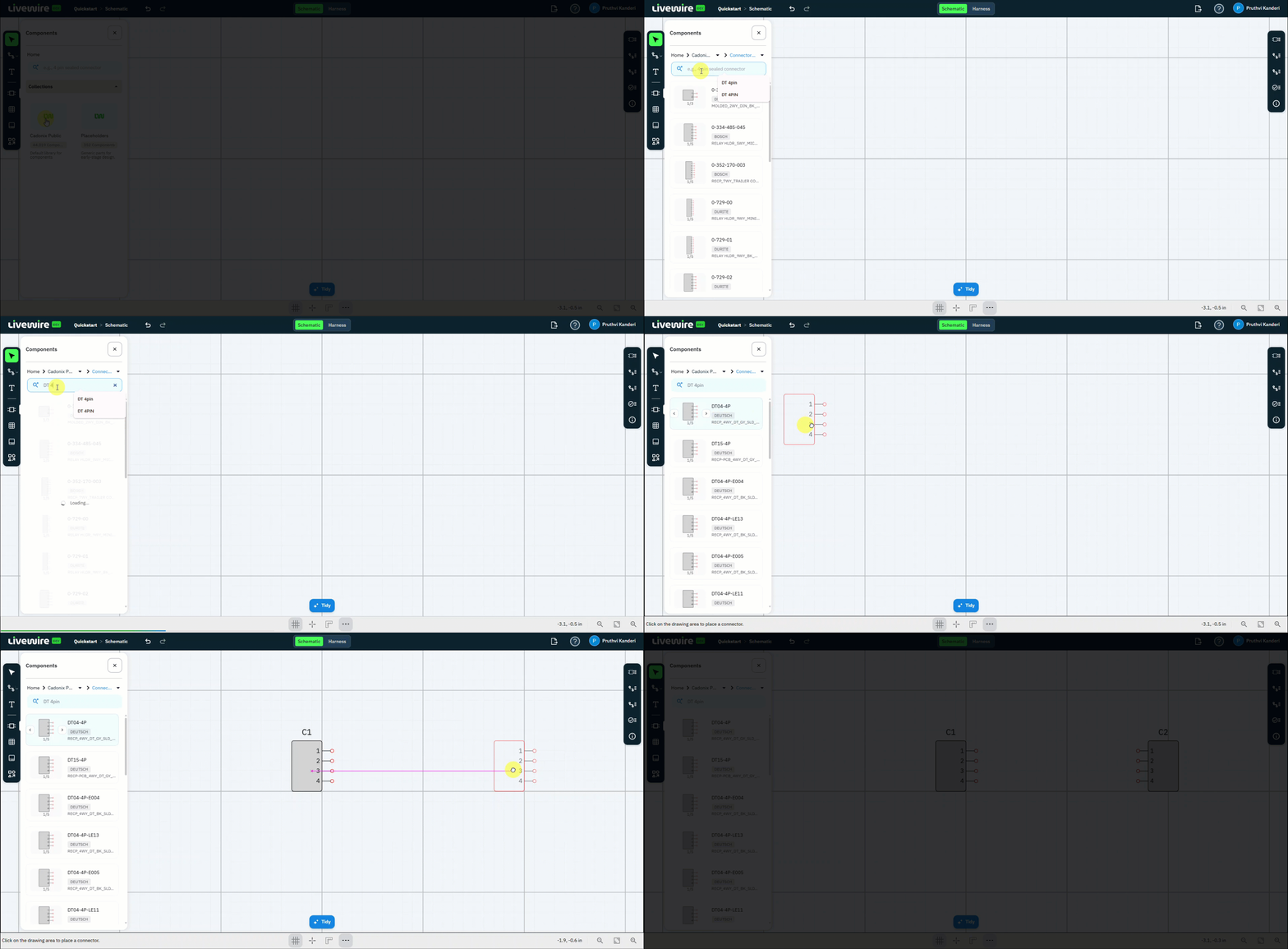
Place your first parts. You'll add two Deutsch DT04-4P connectors to the canvas from the Cadonix Public library, then mirror one of them with the Flip command.
What to do
follow along above-
Open the component table
Open the Components panel to browse the parts available to your design.
-
Open the Cadonix Public library
Under Collections, select Cadonix Public — the default component library.
-
Go to Connectors
Open the Connectors category to narrow the results to connectors only.
-
Search for the part
Type DT 4 pin in the search box to find the connector.
-
Place the connector
Drag DT04-4P onto the canvas. This first instance is placed as C1.
-
Place it again
Drag DT04-4P onto the canvas a second time. This instance is placed as C2.
-
Flip C2
Select C2 on the canvas and run the Flip command to mirror it.
-
Close the component panel
Close the Components panel to clear your workspace and see the full canvas.
You should now have
Two DT04-4P connectors on the schematic — C1 and a mirrored C2 — with the component panel closed.